After Export Actions
Skipper can run an external command automatically when it exports your model. Use these actions to apply your team's coding style with PHP CS Fixer, process generated migration files, or run a script after the whole project has been exported.
The commands use the same configuration as External Tools, but are attached to an export step and saved with your project or module. You do not need to launch them manually after each export.
Configure an action
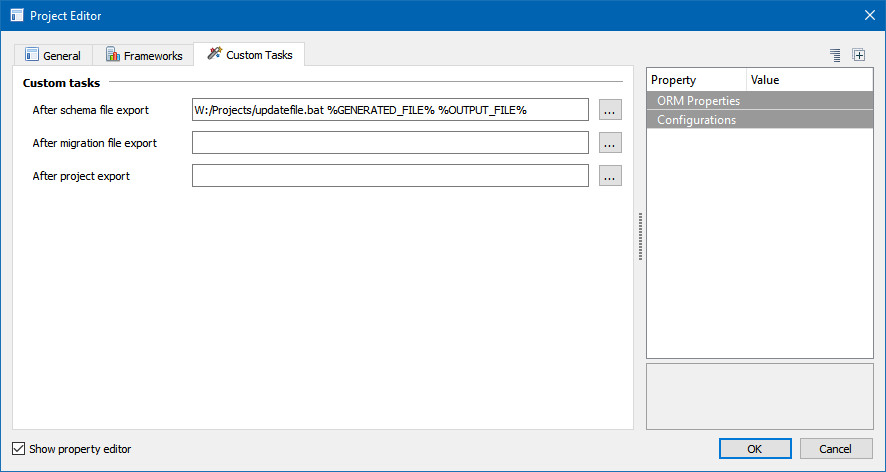
- Open the Project Editor and select the Custom Tasks tab.
- Click the ... button beside the export step you want to customize.
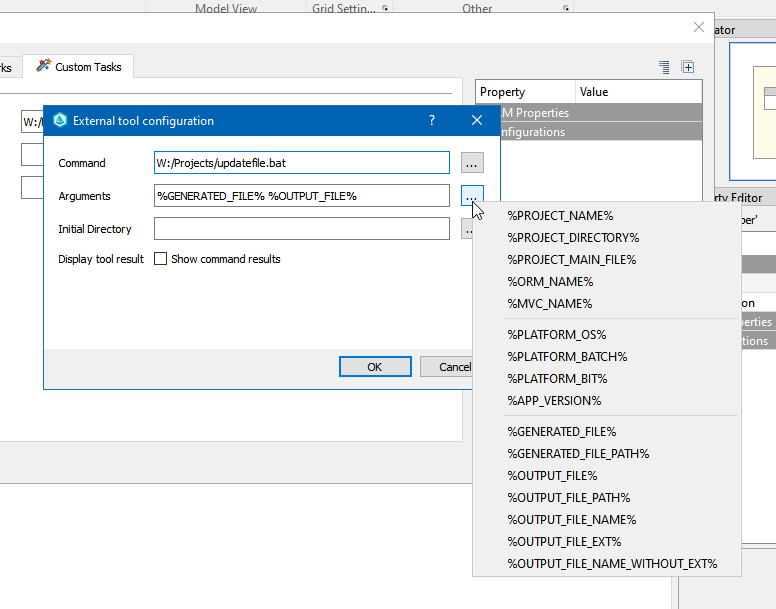
- Enter the Command, Arguments and Initial Directory. The command is the executable; its options and script path belong in Arguments.
- Enable Show command results while checking the setup so you can inspect the tool's output.
- Confirm both dialogs, save the project, and use Export to ORM.
| Action | When to use it |
|---|---|
| After schema file export | Process each generated schema file, such as a Doctrine entity or embeddable. The action runs on the generated temporary file before Skipper compares it with the destination and saves it. |
| After migration file export | Process each generated migration file in frameworks that support migration export. This also uses the generated temporary file. |
| After project export | Run one command after the project's ORM export has processed its files. Use this for an existing script that works on the exported directories. |
For file actions, modify %GENERATED_FILE% in place. %OUTPUT_FILE% identifies the final destination, which may still contain the previous version or may not exist yet. Formatting the temporary file lets Skipper compare the formatted result with the existing file.
Example: PHP CS Fixer
When your Symfony project uses single quotes or other formatting rules, keep those rules in your existing PHP CS Fixer configuration. Skipper generates the ORM code and the fixer applies your project's conventions.
These examples assume PHP CS Fixer is installed in vendor/bin/php-cs-fixer, and your .skipper file and .php-cs-fixer.dist.php configuration are both in the PHP project root. Adjust the paths if your files are elsewhere. Use the full path to the PHP executable if php is not available to Skipper.
Format each generated file before it is saved
Configure After schema file export with these values:
Command:           php
Initial Directory: %PROJECT_DIRECTORY%
Arguments:         vendor/bin/php-cs-fixer fix "%GENERATED_FILE%" --config="%PROJECT_DIRECTORY%/.php-cs-fixer.dist.php" --path-mode=override --using-cache=no
The explicit configuration path makes the same rules available when processing a temporary file outside your source tree. --path-mode=override selects that file instead of the directories in the configuration's Finder; --using-cache=no avoids caching temporary filenames. Apply this action only to modules that export PHP files.
This approach runs the fixer for each generated file. It also avoids reporting a file as changed solely because Skipper and your formatter use different styles, provided the formatted result matches the existing file.
Run once after the whole project export
If you already have a script that formats all exported entities and embeddables, attach it to After project export. To run PHP CS Fixer directly, use:
Command:           php
Initial Directory: %PROJECT_DIRECTORY%
Arguments:         vendor/bin/php-cs-fixer fix --config=.php-cs-fixer.dist.php
In this example, the configuration's Finder determines which files are formatted. Include your entity and embeddable directories there. This runs the fixer once per project export, but it happens after Skipper's file comparisons, so formatting-only differences can still appear in the export results.
Choose the file action or the project action for the same formatting job to avoid running it twice. For a shell script, set Command to the appropriate interpreter, such as cmd.exe on Windows or /bin/sh on macOS and Linux, and pass the script and its arguments in Arguments. See the PHP CS Fixer usage guide for its command-line options.
Pass paths and project information with macros
Skipper replaces macros when it runs the action. Use the ... menu beside Arguments or Initial Directory to insert an available macro. Put double quotes around path arguments, for example "%GENERATED_FILE%", so paths containing spaces remain one argument.
File actions
These macros are available for schema and migration file actions.
| Macro | Value |
|---|---|
%GENERATED_FILE% | Full path to the temporary generated file. Modify this file to change the exported content. |
%GENERATED_FILE_PATH% | Directory containing the temporary generated file. |
%OUTPUT_FILE% | Full path to the intended destination file. |
%OUTPUT_FILE_PATH% | Directory of the destination file. |
%OUTPUT_FILE_NAME% | Destination filename, including its extension. |
%OUTPUT_FILE_EXT% | Destination file extension. |
%OUTPUT_FILE_NAME_WITHOUT_EXT% | Destination filename without its extension. |
Project action
%OUTPUT_DIRECTORY% is available for the project action and identifies the export destination. For a normal multi-file ORM export, it is the export directory. The per-file macros above are not available for this action.
All actions
| Macro | Value |
|---|---|
%PROJECT_NAME% | Skipper project name. |
%PROJECT_DIRECTORY% | Directory containing the Skipper project file. |
%PROJECT_MAIN_FILE% | Full path to the Skipper project file. |
%ORM_NAME% | Selected ORM framework name. |
%MVC_NAME% | Selected MVC framework name. |
%PLATFORM_OS% | Operating system reported by Skipper. |
%PLATFORM_BATCH% | bat on Windows, sh on other platforms. |
%PLATFORM_BIT% | Bitness of the Skipper application. |
%APP_VERSION% | Skipper application version. |
Module overrides and team setup
To use a different schema action for one module, open its Module Editor, select Custom Tasks, and configure After schema file export. The module action replaces the project's schema action for that module. Clearing the module action restores the project default.
Project actions are saved in the Skipper project file. A module override is saved with the module, including when the module is stored in an external file. Commit these files together with your script and formatter configuration so the team uses the same setup. Each developer still needs the required tools installed; project-relative paths and %PROJECT_DIRECTORY% help avoid machine-specific paths.
Check the setup
- The command cannot be found: check the executable path and Initial Directory. A desktop application may have a different PATH from your terminal.
- The fixer processes no files: check the Finder directories for a project action. For a file action, use
%GENERATED_FILE%with an explicit configuration path and--path-mode=override. - Formatting is overwritten: a file action must modify the generated temporary file. Editing
%OUTPUT_FILE%at this stage can be overwritten when Skipper saves the generated result. - A module behaves differently: check its Custom Tasks tab for an override.
- A result dialog appears for every file: disable Show command results once you have verified the command. Check the output again if the action stops working.
See also Project Export and the original Symfony formatting discussion, where automatic export actions were introduced. The screenshots above come from that discussion.