Four times faster development
Increase speed and comfort of your work with a sophisticated ORM editor.
Import, edit, and export definitions with just a few clicks.
Powerful project import
Import your current, older, or unknown project and get a complete overview of all its objects and logic. Or create a new model from scratch.

Repeatable editing and export
Change your model and repeat the export as many times as you need. Ready-to-use definitions generated by one click help you do it simply and quickly.

Export of standardized ORM definitions
The project model is transferred to the definition files through well-designed templates compliant with all framework standards and rules. Supported export formats are XML, YML, and Annotations.

XML

YML (YAML)

Annotations
Clear visual model
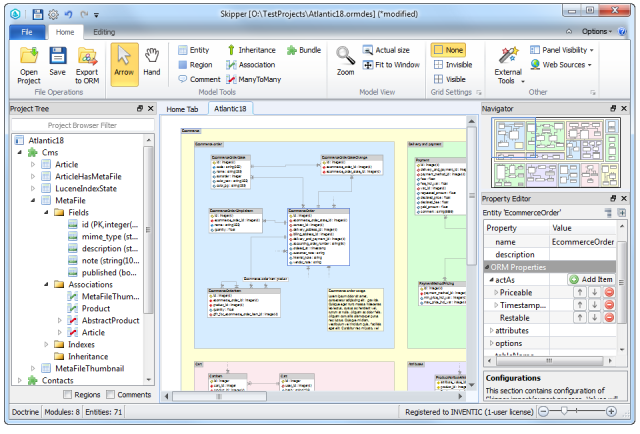
ORM schema is displayed in the visual model using an enhanced ER diagram. Skipper is a full-feature visual editor for projects using object-relational mapping.
Unlike other ORM tools, Skipper combines its visual model with editing capabilities and code generation.

Objects edited directly in the visual model
All objects are editable with a few clicks through a smart graphical interface. Move, create new, edit or remove:
Modules
Regions
Entities
Associations
Inheritances
ORM properties
Common properties
Indexes
Comments


Supported frameworks
Doctrine
Doctrine2
Laravel
Symfony
Customized & in-house
MongoDB
Propel
Knex.js
CakePHP
Zend Framework
Stop writing definitions manually
Download 14-day trial version. No credit card needed.
DownloadFREE TRIAL
No space for errors in definitions
No typos or syntax errors
Smart wizards, value completers, validators, and assistants help you create 100% valid definition files. Now you can stop remembering the whole ORM syntax and keywords.
No missing or redundant definitions
Create a new object and with the next export it will be added where it belongs. Remove it and it will be deleted from everywhere.

Enhancements for efficient work

Keyboard shortcuts
Increase your productivity by using keyboard shortcuts for all types of actions.

Modules sharing
Share modules across multiple projects. Changes in one are transferred to the others.

External tools
Define and run third party tools directly from the application and save your time.
Fast navigation through the model
Use the context menu in the Project tree and locate the chosen object. Or view the desired area by clicking on the specific point in the Navigator window.

Pleasure to use

Intuitive dialogs
Create and edit objects and their properties through smart and intuitive editors and dialogs.

Color palettes
Use the pre-defined color palettes and make your model nice and easy to navigate.

Customizable grid
Set the grid according to your preferences and align objects in your model as you need.
Customizable to your needs
Extending templates
Define your own templates or use the most common and useful templates from the prepared library. Predefine naming conventions, attributes, or values and save a lot of work.
ORM properties adaptation
Extend your schema definitions with custom properties. Customize existing or define new properties and behaviors, override enum values or types, adjust other settings.
Export customization
You can extend export scripts so they generate other formats or output that you need. Export customization also allows you to utilize and run other external tools.
Fully translatable
Do you prefer to work with the application in your native language? You can add your translation and if you want to, you can share it with the community as others do.
Download 14-day trial version
Try Skipper for free version. No credit card needed.
Strong team behind you

Swift development
Regular updates bring new features and enhancements based on user requests.

Well documented
In the detailed documentation, you can find everything from the very basics up to expert knowledge.

Helpful support
Write us any questions or ideas on our support forum or send us an email. We are here for you.
Over 5,000 companies use Skipper every day
“

We have good use of the tool. It simplifies our daily work, saves us time and is simple and intuitive to use.
Thomas Somoen, Try/Apt
”
“

It is faster and gives less errors to have Skipper create the mapping code instead of writing it myself. Later in the development process I often use the Skipper diagram as a quick reference.
Herman Peeren, Yepr
”